NewPromises: what you owe, and what you are owed

A second brain that listens for you

Listening changes everything.

Most of what moves your work forward is said out loud and then lost: the decision, the reason behind it, who promised what, the small thing a client mentioned once. Losing it costs you twice, once when it is forgotten and again in the follow-up call to piece it back together. Listen hears it once and keeps it: what you owe and what you are owed, where you left off with each person, and why a decision was made. Every answer opens the moment it was said, so you can act on it instead of asking again.

No account · No meeting bot · Your audio stays on your devices

The problem

The best context never makes it into your notes.

The promise somebody made at the end of a call. Why the team rejected the first plan. The detail a client mentioned three months ago. The exact words behind a decision everybody now disagrees about. These are the things that make your next move better, and they are the first things ordinary notes lose.

  • You rebuild old decisions from fragments. The reason was said out loud once and written down nowhere.
  • You walk into recurring conversations cold. Ten minutes before the call you cannot remember what was left unresolved.
  • You teach your AI the same context every time. The first prompt is always the project, the people and the history, typed again.
  • You hold the meeting about the meeting. Nobody wrote down who agreed to do what, so the next call starts by working it out again.

How it works

Listen. Remember. Use.

Three ordinary things, and the middle one is the part nothing else does.

Listen A call on your Mac, with nothing joining it, or a conversation in a room on your iPhone. It asks the moment it starts, and “No” throws the audio away.
Remember It works out who spoke, and builds a memory of the people, projects and decisions you choose to keep. Each detail carries the sentence it came from.
Use Ask it, here, and get an answer with the receipts attached. See the whole library at once. Open the week and find out what actually changed.

What it remembers

A memory you can act on.

What was said becomes what happens next: the promises to keep, where you left off with each person, what changed this week, and an answer to anything you ask in Chat, each one opening the moment it was said.

Follow-through

The Promises page in Listen: what you owe, what you are owed and your own to-dos, grouped by when each is due, each with the sentence that was said and the call it came from.

Nothing you were promised slips through.

“I’ll send you the numbers by Friday.” Promises are made in passing and kept on memory, which is why so many quietly aren’t. Listen keeps them in two columns, what you owe and what you are owed, each in the words somebody actually said.

  • Dated the way it was said, and orange once it has passed
  • Closed by the next conversation, quoting the sentence that did
  • Your AI can chase one by email and close it from the reply. How →

Read by TypeSafe’s decision model with your own key: the transcript lines of one conversation at a time, never the audio, and it answers with choices rather than text.

A page per person

Every detail says where it came from.

What they are working on, what they asked you for, what changed since last time. Each line carries the recording, the speaker and when it was said, and pressing it opens the sentence itself.

  • People, projects, decisions and the reasons behind them
  • Correct, pin or hide anything; a rebuild keeps it
  • Off until you ask, per person, with a daily limit and a pause

This week

What changed, and what to do about it.

A deck of cards over the week's conversations: the people and notes that arrived, what was promised, and who you are seeing next. Every card carries something to do.

  • This week, last week, this month: a named period, not a rolling one
  • Name the speakers nobody labelled, right from the card
  • Derived when you open it, never generated on a schedule

The galaxy

Your whole library, in one picture.

Recordings, notes, people and your conversations with Listen, with a line wherever the library already records a relationship. Search, and the picture narrows to what matches and what it connects to.

  • Nothing inferred: every line is a row you can open and read
  • Distance is the kind of thing, never a guess at importance
  • Drawn from the disk, and reaches no network

Chat

Answers with the receipts attached.

Chat with one conversation or all of them. Every claim comes back with a numbered reference that opens the recording at the moment it came from, and if a model answers without reading anything, Listen says so.

  • Your own subscription, your own API key, or a model on your Mac
  • Claude Code, Codex and any MCP client can read your library
  • An agent can write notes and tags, name a recording, and keep your promises current. That is all.
claude mcp add listen -- /usr/local/bin/listen mcp

It cannot rename a speaker, correct a transcript or delete a recording. Every tool the MCP server exposes →

What you do with it

Three questions you cannot answer today.

Ten minutes before the call

“Catch me up before I speak to Maria again.”

What you last agreed, what she is waiting on, and the thing she mentioned in passing that you meant to follow up. Each line opens the conversation it came from.

When an old decision comes back

“Why did we decide against annual pricing?”

The reasons, in the words they were argued in, with the date and the meeting. Not a summary somebody wrote afterwards.

When your AI needs to know something

“Draft the brief using what customers actually said.”

Your agent reads the relevant conversations over MCP and writes from them, instead of asking you to paste a folder of transcripts into the prompt.

Underneath

The record it is all built on.

A memory is only worth as much as what it was built from. Recording, transcription, the voices and the search over them are free, for ever, with no meeting count and no trial clock.

Record

Both sides of the call, and no bot in it.

Your microphone on one track, everything your Mac plays on the other. Nothing joins the call, so it works on WhatsApp and FaceTime as well as it does on Zoom, Meet and Teams. You do not have to remember to start it: Listen spots the call, begins recording, and only then asks whether you want it.

  • It is already recording when it asks, so the answer costs you nothing
  • Say never once and it stops asking about that app
  • Asks to record audio, not your screen

Transcribe

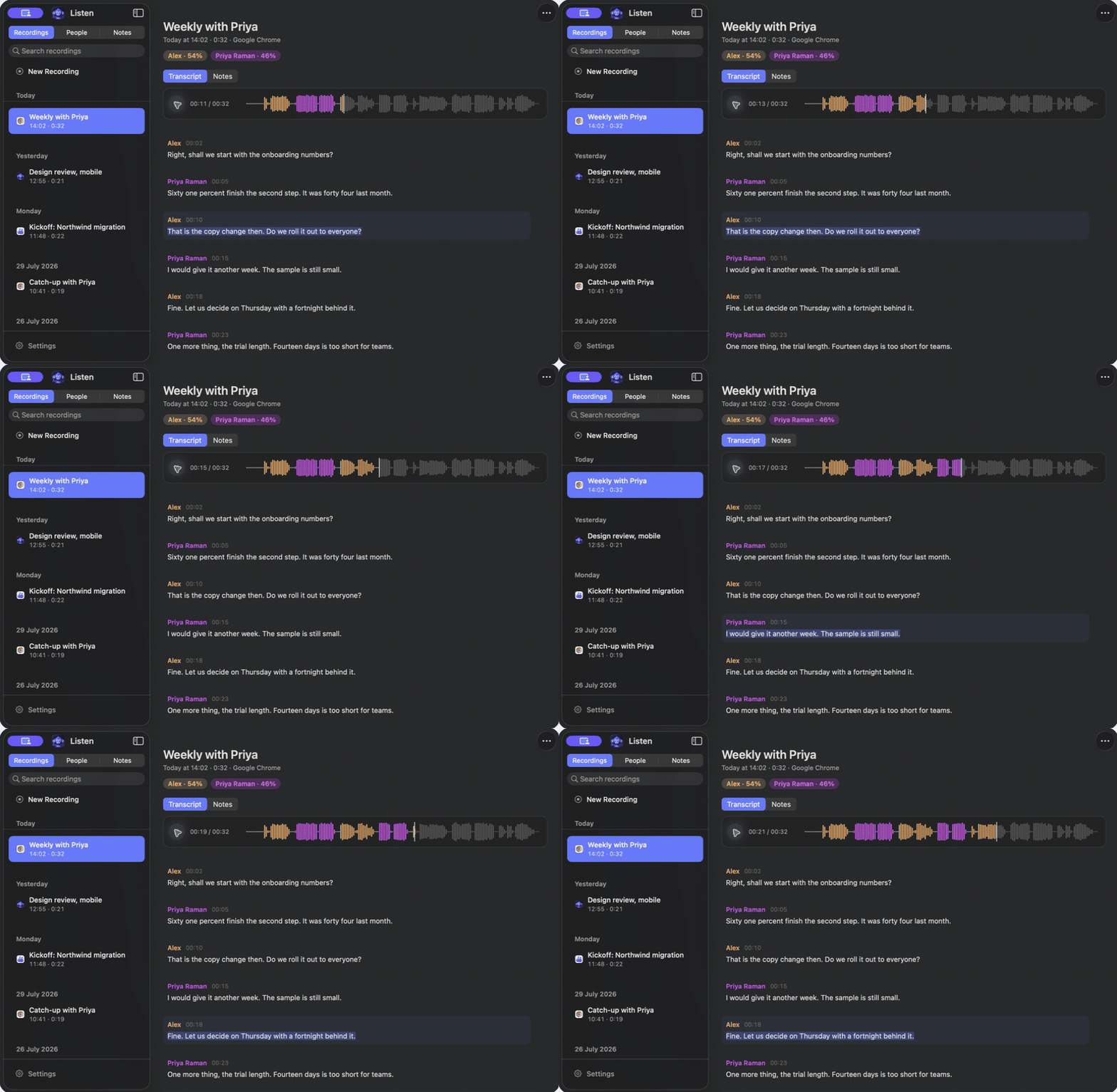
Scrubbing a meeting on the waveform while the sentence being spoken lights up in the transcript.

Written up before you've made coffee.

Transcribing happens on your Mac's own chip, about 240 times faster than real time on an M4 Max. Play a meeting back and the transcript follows along, sentence by sentence, so you can find the bit you half remember without listening to the rest.

  • Fix one sentence without touching the paragraph around it
  • Reads 25 languages, and works out which one it's hearing
  • Teach it the names and jargon it keeps getting wrong

Speakers

Name someone once. Listen knows them next time.

Listen works out who spoke and puts names on the turns. Tell it who someone is once, and it recognises them in the next meeting they turn up in. On a call it never has to guess at your own voice.

  • Works for a room too, with the laptop on the table
  • Fix a whole speaker, one paragraph, or one sentence
  • Voiceprints are biometric data, and yours never leave your Mac

Notes

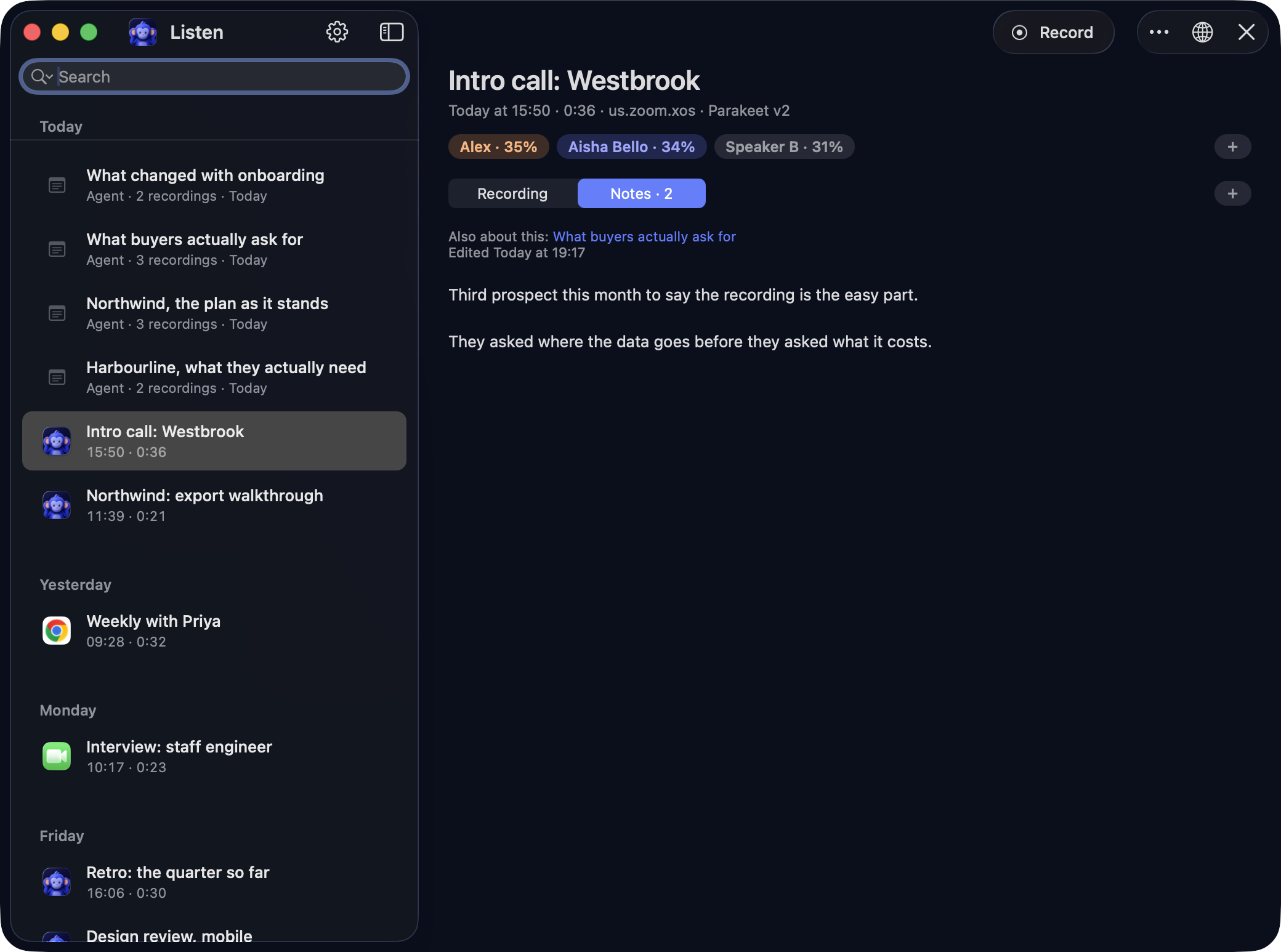
The Notes tab on a recorded call: your own note on the call, with a link to the agent note about what buyers ask for.

Your notes stay yours.

Write your own notes while the meeting is still running, which is when they're worth the most: “we should upsell them” is the kind of thing no transcript will ever hold. Ask an agent for a summary and it writes a separate one. It can read yours. It cannot change them.

  • No New Note button. Open a recording, click Notes, start typing
  • One note can cover four meetings, and outlive any of them
  • Tag a meeting in your own words, and ask for that tag later

Dictate

Talk anywhere on the Mac, and it types.

Press fn + left shift wherever you're typing, say what you want written, and press it again. The words land where the cursor is, in an email, in Slack, in a search bar, and on the clipboard as well.

  • The same model, and the same vocabulary, your meetings use
  • On macOS 26, an optional pass that drops the ums
  • Needs Accessibility. Recording meetings never does, so it never asks

Your devices

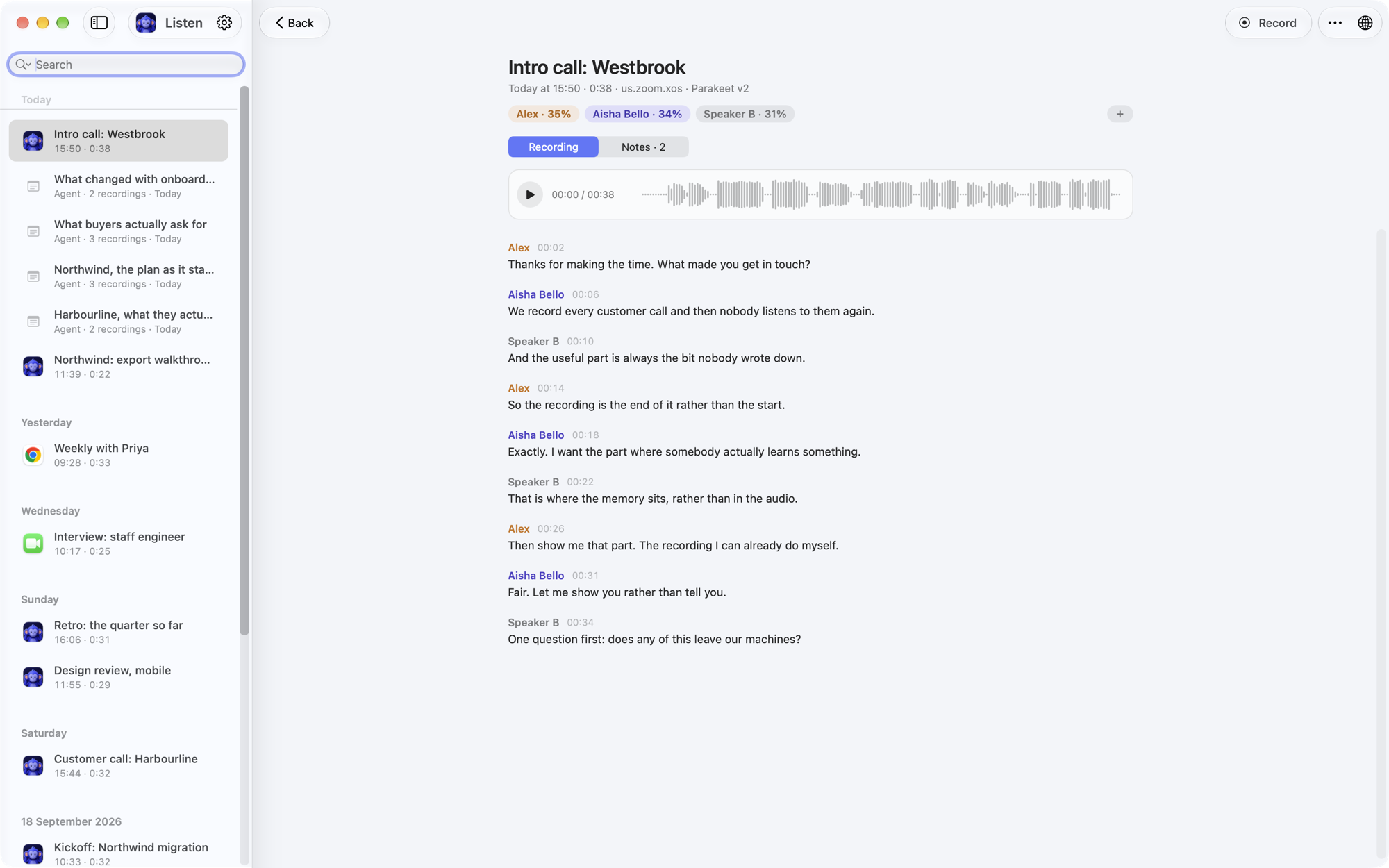
Listen on a Mac: a recorded call with its speakers named, the waveform and the transcript.
Listen on iPhone: a conversation in the same library, with its speakers and transcript.
A call on the Mac and a conversation on your iPhone land in one library, written down and named on whichever device holds them.

Start on one Mac, pick up on the other.

Turn on sync and your transcripts, notes, people and tags follow you between Macs, through your own private iCloud rather than anybody's server. Listen seals all of it on the device first, with a key Apple never holds. There's nothing to pair and no code to scan.

  • The audio travels too. An hour of meeting is about 61 MB
  • No device deletes its copy until another one has it
  • Anything a sync removes is kept for fourteen days

Works with

Listen records the audio your Mac is already playing, so it needs nothing from the app on the other end. That includes the ones no notetaker bot can reach.

And anything else that makes sound on your Mac.

The iPhone app is in TestFlight. It records the conversations that happen in a room rather than on a call. On supported phones with iOS 26 or later it transcribes and separates voices, and writes into the same memory: a name your Mac already knows can appear with the turns. The Mac keeps the heavier transcription model, call capture and MCP server. See what works on iPhone →

Trust

A memory this personal should be yours.

There is no Listen server, so there is nothing to breach and nothing to hand over. Your meetings are saved on your own computer, and the recording, the transcript and the names on it are all made there. No account. The app sends anonymous usage counts, which you can turn off in Settings, and every one of them is listed here. The features that use an AI model, such as asking questions, profiles and promises, send the text of a conversation, never the audio, and only once you switch them on.

  • Nothing is kept without you knowing. Listen asks on screen the moment it starts, and “No” deletes the audio. Say never once and it stops asking about that app at all. Between calls it is watching for a call to start, not listening to the room.
  • The memory is yours to correct. Every detail it learns carries the sentence it came from, so a wrong one is visible rather than buried, and it can be edited, retired or deleted. Building it is off until you turn it on.
  • It works with the Wi-Fi off. None of it waits on a connection, so losing the network does not cost you the meeting.
  • Your recordings are ordinary files. A folder you own, that you can move, back up or delete. There is nothing to export, because nothing was ever taken.
  • Keep everything, for as long as you like. Your library is a folder on a disk you already own, so no history expires and nothing is held back to be unlocked later.

Three things can send anything out, and each is off until you turn it on: keeping your library in step across your own devices, putting a question to a hosted model, and building the memory, which reads passages to whichever model you point it at. Listen seals anything that travels before it leaves the device, with a key we never hold, so there is nothing readable at the far end. Point all three at a model running on your own Mac and none of it leaves the machine at all.

None of which has to be taken on trust. Listen ships a machine-readable list of every connection it is allowed to make, inside the app, which firewall tools like Little Snitch read straight out of it. Point one at Listen and watch. What runs where sets out each connection and how to check it yourself, and there are answers ready for a privacy or HIPAA review.

Somewhere with rules about this? Listen can be locked down centrally through the same device profiles an IT team already uses: sync off, questions answered only by a model on the machine, no dictation history, backups pointed wherever policy says. Deploying under HIPAA or GDPR has the detail.

Where it sits

What kind of memory do you want?

Categories rather than named products, because naming one dates this table the week they ship something. Check any row against the tool you actually use.

A meeting summariser A notes app Memory inside one AI Listen
Starts from real conversationsYesOnly what you typeOnly what you tell itYes
Carries people and projects forwardRarelyBy handInside that one vendorYes
Links a claim to what was saidSometimesSometimesRarelyYes, every one
You can correct what it learnedLimitedYesLimitedYes
Readable by the AI you chooseLimitedVariesUsually notIn the app, and over MCP
Runs without a vendor serverNoVariesNoYes

Every row is a claim about a category, not about a named product, and is worth re-checking against whatever you are comparing it with.

Who it is for

For the conversations that are yours.

A Zoom call, a WhatsApp call on your Mac, a coffee recorded on your iPhone, a voice memo on the walk home. One a week or ten a day, Listen keeps them in a library that belongs to you rather than to a team workspace, and turns what was said into what you do next. Some of the people it suits best:

Fractional leaders Four companies, one memory. Walk into each call knowing where you left off, and what you promised which of them.
Coaches and consultants They booked your attention. Spend the hour on them, and let Listen keep what you said you would send.
Creators and podcasters Every interview and guest call written down, with the exact quote and the moment it was said.
Solo founders Investors, customers and candidates back to back. Nothing anybody promised you slips through.

Coming from Otter, Fireflies, Granola, Plaud or Pocket? How Listen is different →

From people using it

What it is actually for.

I’ve tested many similar apps out there, and Listen is finally the one that stuck. I love owning my data, and the dictation is my daily driver.

Daniel AndradeFounder, VitalTrends

Get Listen

Build the memory you wish every AI already had.

Download it, record one conversation, name the people in it, then ask what was said. The memory grows from there. Recording is free for ever; what it costs has the rest. Apple silicon, macOS 14 or later, and the speech model is about 2.5 GB the first time you run it.

Prefer Homebrew? brew install --cask mugoosse/tap/listen